
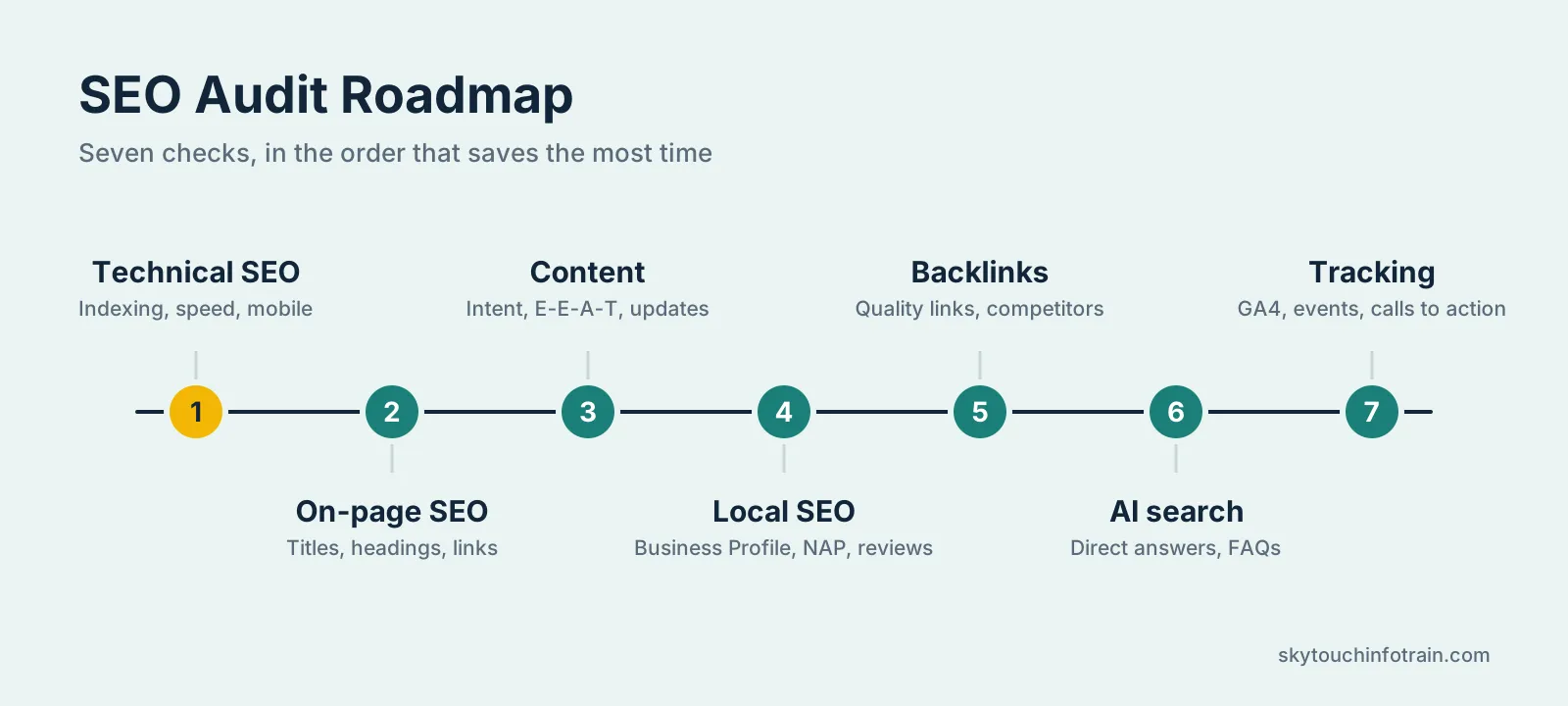
Quick answer: what is an SEO audit checklist? An SEO audit checklist is a list of sequential points that explains how you’re not receiving enough Google clicks. The key audit points for a small business are indexing speed mobile, on-page SEO content local SEO, links and measurement.
Most small business websites lose traffic for simple reasons. A page is not indexed. A title tag is missing. The site loads slowly on mobile. Nobody noticed because nobody checked.
This checklist fixes that. You do not need an expensive tool or a technical degree. Most steps can be done with free tools, a spreadsheet and one afternoon.
What Is an SEO Audit?
A site audit is a health check for your website. You analyze how Google views your website, what’s stopping your pages from ranking, and what should be done first.
Think of it like a service for your car. Nothing looks broken from outside, but small problems add up over time.
For a small business, an audit does three things:
- Finds technical errors that stop Google from reading your pages
- Shows weak pages, thin content and missing keywords
- Gives you a short, clear to-do list in order of impact
Free Tools You Need Before You Start
You can finish this audit with these tools:
- Google Search Console for indexing, errors and search queries
- Google Analytics 4 for traffic and conversions
- PageSpeed Insights for speed and Core Web Vitals
- Screaming Frog (free version) to crawl up to 500 URLs
- Google Business Profile for local search
- A simple Google Sheet to note every issue and its status
Open the sheet first. Make four columns: Issue, Page URL, Priority and Status. Every problem you find goes in this sheet.
Step 1: Technical SEO Checks
Technical SEO decides whether Google can find and read your site. If this part is broken, good content will not help.
1. Check indexing. Type site:yourwebsite.com In Google, search for site: yourwebsite.com. Review the results against the number of pages you have. Head to Search Console (under Pages section) and see the explanations for the pages that are not indexed. Critical pages must not stay under Crawled currently not indexed for long periods.
2. Review robots.txt and sitemap. Check out your website.com/robots.txt keep your whole site from being accidentally blocked. (You’d be surprised how common this is, mostly if you just re-designed your website.) And ensure your XML sitemap is submitted in Search Console and it references only the pages that are published.
3. Confirm HTTPS. Every page should load on https. Check that http and www versions redirect to one main version with a 301 redirect.
4. Test speed and Core Web Vitals. Run your homepage and two key service pages through PageSpeed Insights. Aim for these numbers on mobile:
- Largest Contentful Paint (LCP): under 2.5 seconds
- Interaction to Next Paint (INP): under 200 milliseconds
- Cumulative Layout Shift (CLS): under 0.1
The usual fixes are compressing images, using WebP format, removing unused plugins and enabling caching.
5. Check mobile usability. Phones have become the most popular search method. Check your website on an actual phone read all of the text and see if you don’t have to zoom in to view it.
6. Fix broken links and redirect chains. Crawl your site and identify all 404s redirect old URLs to the most relevant available page Remove redirect chains consisting of one URL jumping through three other URLs to get there.
7. Look for duplicate pages. Check for the same content on more than one URL, such as with and without a trailing slash, or filter pages. Use canonical tags to show Google the main version.
Step 2: On-Page SEO Checks
On-page SEO is what you control inside each page.
8. Title tags. Each page needs a unique title under about 60 characters, with the main keyword near the start. Add a reason to click. Missing and duplicate titles are the most common problem we see on small sites.
9. Meta descriptions. Keep them around 150 to 155 characters. Write them like a short ad: what the page offers and what the visitor should do next.
10. Heading structure. Use one H1 per page. Use H2 and H3 headings to break the content into clear parts. Do not stuff keywords into every heading.
11. URLs. Short and readable is better. /seo-audit-checklist/ beats /blog/post?id=482.
12. Image alt text. Describe what is in the image in plain words. This helps accessibility and image search.
13. Internal links. Your relevant pages should link to each other. E.g. If you are a service company, your blog posts should link to the individual service page. Pages without internal links are difficult for Google to rank.
14. Schema markup. Add LocalBusiness, Organization, FAQ or Article schema where it fits. Test it in Google’s Rich Results Test.
Step 3: Content Quality Checks
Google wants helpful content written by people who know the subject. Review your pages with this in mind.
15. Match search intent. Search your main keyword and read the top five results. Are they guides, service pages or product pages? Your page type should match.
16. Find thin and outdated pages. In Search Console, look at pages with impressions but almost no clicks, or pages that lost traffic in the last six months. Update them, merge them or remove them.
17. Check for keyword cannibalization. If two of your pages target the same keyword, they compete with each other. Pick one main page for each keyword and change the other.
18. Show real experience (E-E-A-T). Add author names, short bios, real photos, case studies, client results and contact details. Say how you know what you write. A page that looks anonymous is hard to trust.
19. Update dates and facts. Old prices, old screenshots and old years in titles make a page look neglected.
Step 4: Local SEO Checks
Local SEO gives results the quickest if you are serving people in a city or locality. This is in particular true for clinics shops coaching centres and service providers in Noida, Delhi, and Gurugram.
20. Google Business Profile. Check your business name, categories, address, hours, phone number, services and photos. Add new photos and posts regularly.
21. NAP consistency. Your Name, Address and Phone number should be the same on your website, Google profile and every directory. Even small differences, like “Sector 1” and “Sec-1”, can confuse search engines.
22. Reviews. Ask happy customers for reviews and reply to every review, good or bad. Fresh reviews are a strong local signal.
23. Location pages. If you are targeting more than one location create a useful page for each of them. Do not copy the same thing just replace the name of the city.
24. Local citations. Add your business to directories like Justdial Sulekha and your niche specific sites.
Step 5: Backlink Checks
25. Review your backlink profile. In Search Console, open Links and see who links to you. Look for spammy links from unrelated sites.
26. Find easy link opportunities. Look for brand mentions without links, local business associations, partner websites and guest posting on relevant blogs.
27. Compare with competitors. See which sites link to the businesses ranking above you. Pick two or three realistic ones to approach.
Quality matters more than numbers. Ten links from relevant, real websites are worth more than hundreds from junk directories.
Step 6: AI Search Readiness (New for 2027)
More people now get answers from Google AI Overviews and AI assistants before they click any result. You cannot control that fully, but you can make your pages easier to quote.
28. Answer questions directly. Put a short, clear answer (40 to 60 words) right under the question heading, then explain in detail below.
29. Use question-style headings. Headings like “How often should I do an SEO audit?” match how people ask.
30. Keep facts clear and checkable. Use specific numbers, dates and named sources. Vague claims are rarely quoted.
31. Allow crawling. Check that your robots.txt does not block Googlebot or the AI crawlers you want visibility from.
Step 7: Tracking and Conversion Checks
Traffic without leads is just a number.
32. Confirm GA4 is working. Check that it records visits on every page, including the thank-you page.
33. Track key actions. Set up events for form submissions, phone clicks, WhatsApp clicks and email clicks.
34. Connect Search Console with GA4. This lets you see which queries bring visitors who actually convert.
35. Check your calls to action. Every important page should tell the visitor what to do next, in a clear button or short form.
How Often Should You Do an SEO Audit?
3x full audit. Perform Search Console monthly quick check for new errors, clicks, and indexation issues. Run a complete audit after a redesign migration CMS switch or big drop in traffic.
Common Mistakes to Avoid
- Fixing everything at once instead of starting with the biggest issues
- Blocking pages in robots.txt during development and forgetting to remove it
- Writing content for search engines instead of readers
- Ignoring mobile speed because the site looks fine on a laptop
- Running an audit once and never checking again
How to Prioritize Your Findings
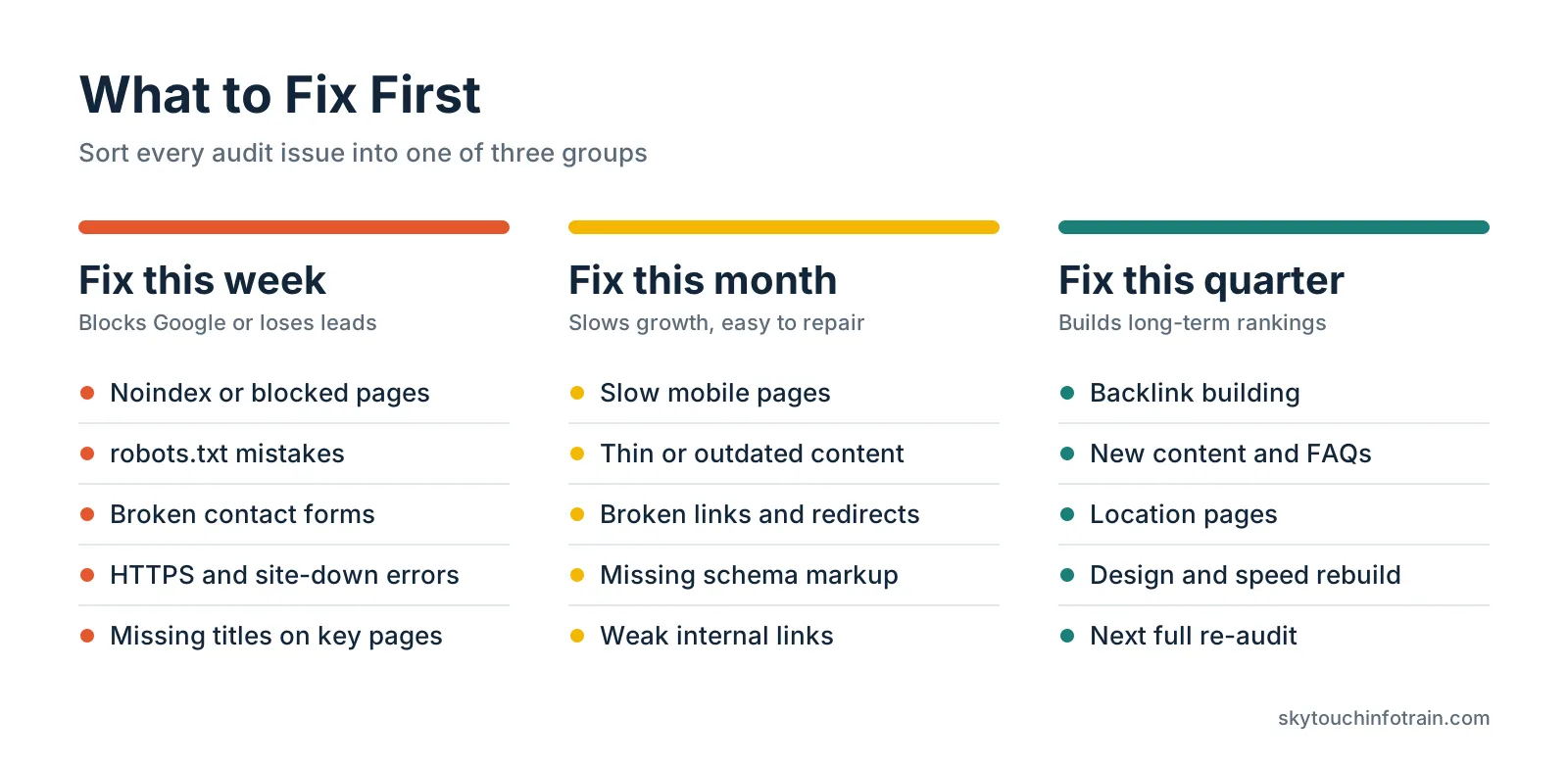
After the audit, sort every issue into three groups:
- Fix this week: Noindex errors, blocked pages, broken forms, site down issues, missing titles on key pages
- Fix this month: Slow pages, thin content, broken links, missing schema, weak internal links
- Fix this quarter: Backlink building, new content, location pages, design improvements
This order keeps you from wasting time on small tasks while a big problem is still open.
When Should You Hire an Expert?
You can do most of this yourself. But, if you have dozens of errors, your traffic is still falling monthly, or you’re just short on time, then an audit can save you months of trial and error.,A good Search Engine Optimization Company in Noida will give you a clear report with priorities, not just a long list of errors.
Sometimes the problem is the website itself: slow code, poor structure or an outdated design that cannot be fixed with small edits. In that case, working with a Website Development Agency Noida Sector 1 can help you rebuild the site on a faster and cleaner base.
Final Thoughts
An SEO audit is not a one-time task. It is a habit. Start with the technical checks, fix the biggest issues first, and write down every change so you can see what worked.
If you want a second pair of eyes on your website, the team at Skytouch Infotrain is happy to review it and point out where to start. Get started with a free website review today.
Frequently Asked Questions
How long does an SEO audit take for a small business website?
A site with 20 to 100 pages usually takes four to eight hours to audit by yourself with the right tools. A professional audit with a written report takes a few days.
Can I do an SEO audit for free?
Yes. Google Search Console, GA4, PageSpeed Insights and the free version of Screaming Frog cover most of what a small site needs.
What is the most important part of an SEO audit?
Indexing and technical access come first. If Google cannot crawl or index your pages, nothing else matters.
How is a local SEO audit different?
A local audit adds checks for Google Business Profile, reviews, citations and NAP consistency on top of the normal website checks.
How soon will I see results after fixing audit issues?
Technical fixes can show in a few weeks. Content and link improvements usually take two to four months to show clear movement.